Chore Wheel
The Chore Wheel is a free random chore picker that assigns household tasks fairly, so nobody can say they always get the worst job.
Add the chores that need doing, then let each person spin for their task. The wheel works for daily jobs like dishes and trash, weekly cleaning, or a one-off weekend clean-up.
To share out every chore once, turn on Remove the winner automatically in Settings. Each chore leaves the wheel after it is picked, so the next person spins for what is left.
- 10 entries
- 1 in 10 chance each
- Decision Wheels
- Free, no sign-up
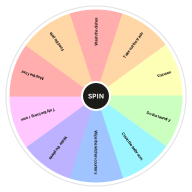
What's on the Chore Wheel
Change any entry in the Entries box next to the wheel, add your own or take some out. Your version is saved in this browser, and Reset brings the template back.
Edit Entries- Wash the dishes
- Take out the trash
- Vacuum
- Do the laundry
- Clean the bathroom
- Wipe the kitchen counters
- Water the plants
- Tidy the living room
- Mop the floor
- Feed the pets
Ways to Use the Chore Wheel
-
Families
Let everyone spin for their chores so the list feels like a game rather than a rule.
-
Roommates
Split shared cleaning fairly without keeping score of who did what last week.
-
Classrooms
Assign classroom jobs such as line leader or board cleaner at the start of each week.
-
Offices
Rotate kitchen duty, coffee runs and other shared tasks across a team.
Chore Wheel vs. a Chore Chart
A chore chart sets a fixed rotation, which works until someone swaps or skips a turn. The Chore Wheel picks fresh each time and everyone sees the result, so there is less to track and less to argue about. Many families use both: the chart for routine jobs and the wheel for the ones nobody wants.
How to Use the Chore Wheel
Spin
Click the wheel or the Spin button at its center, or press Ctrl + Enter.
Watch It Land
The wheel ticks past each slice and slows down. Whatever stops under the pointer lights up as the result.
Keep It or Remove It
Keep the result, or press Remove so it cannot come up again.
Go Again
Spin as often as you like. The Results tab lists every result.
Related Wheels
See all templates-
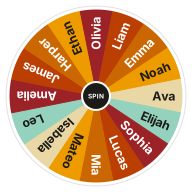 Random Name Picker
Pick a random name from a list with a free wheel of names. Paste your class roster or raffle entries, spin, and remove winners as you go.
Classroom Wheels
Random Name Picker
Pick a random name from a list with a free wheel of names. Paste your class roster or raffle entries, spin, and remove winners as you go.
Classroom Wheels
-
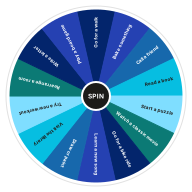 Things to Do Wheel
Bored? Spin the things to do wheel for a random activity, indoors or out. A quick cure for a slow weekend.
Decision Wheels
Things to Do Wheel
Bored? Spin the things to do wheel for a random activity, indoors or out. A quick cure for a slow weekend.
Decision Wheels
-
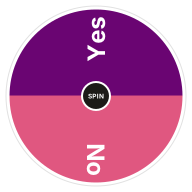 Yes or No Wheel
Can't decide? Spin the yes or no wheel for an instant, fair answer. Free random yes or no picker with a 50/50 chance.
Decision Wheels
Yes or No Wheel
Can't decide? Spin the yes or no wheel for an instant, fair answer. Free random yes or no picker with a 50/50 chance.
Decision Wheels
-
 Coin Flip Wheel
Flip a coin online with a heads or tails wheel. A fair 50/50 coin toss for kick-offs, bets and quick decisions.
Decision Wheels
Coin Flip Wheel
Flip a coin online with a heads or tails wheel. A fair 50/50 coin toss for kick-offs, bets and quick decisions.
Decision Wheels
-
 Date Night Ideas Wheel
Stuck in a date night rut? Spin for a random date idea, from a picnic to a cooking class, and edit the wheel with your own favorites.
Decision Wheels
Date Night Ideas Wheel
Stuck in a date night rut? Spin for a random date idea, from a picnic to a cooking class, and edit the wheel with your own favorites.
Decision Wheels
-
 Dice Roll Wheel
Roll a six-sided die online with a dice wheel. Every number from 1 to 6 has an equal chance, just like a real die.
Decision Wheels
Dice Roll Wheel
Roll a six-sided die online with a dice wheel. Every number from 1 to 6 has an equal chance, just like a real die.
Decision Wheels
Frequently Asked Questions
Quick answers about how the wheel works, what it saves and how fair it is. Want proof? Try the randomness audit.
How do I use a chore wheel with my family?
List the chores one per line, then have each family member spin in turn. Turn on Remove the winner automatically so each chore is only given out once.
Can I make some chores more likely than others?
Yes. Add a chore twice to double its chance, or remove a chore from the list for the week.
Can I change the entries on this wheel?
Yes. Edit the Entries box next to the wheel, one entry per line, and the wheel updates as you type. Your version is saved in this browser, and Reset brings back the template's entries.
Does the wheel keep my results?
Yes. The Results tab lists every spin, newest first, until you clear it or leave the page. Your entries and settings stay saved in this browser.
Does this wheel work on my phone?
Yes. It works in any modern browser on phones, tablets and computers, with nothing to install.
What if I don't like the result?
Spin again. If a result disappoints you, that can be a useful sign of what you really wanted.
Ready to Spin?
Your wheel is waiting at the top of the page, just as you left it.