What to Eat Wheel
The What to Eat Wheel is a free random food picker that chooses a type of food, from pizza and tacos to sushi and pho, when nobody can decide.
Spin the wheel and find a place nearby that serves what it lands on, or cook it at home. The default list covers 16 popular cuisines and dishes.
Add local restaurants or remove foods you don't eat. For a specific chain, use the Fast Food Wheel, or for home cooking, the What's for Dinner Wheel.
- 16 entries
- 1 in 16 chance each
- Food Wheels
- Free, no sign-up
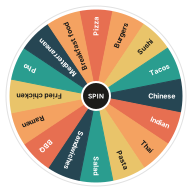
What's on the What to Eat Wheel
Change any entry in the Entries box next to the wheel, add your own or take some out. Your version is saved in this browser, and Reset brings the template back.
Edit Entries- Pizza
- Burgers
- Sushi
- Tacos
- Chinese
- Indian
- Thai
- Pasta
- Salad
- Sandwiches
- BBQ
- Ramen
- Fried chicken
- Pho
- Mediterranean
- Breakfast food
Ways to Use the What to Eat Wheel
-
Couples
End the nightly where-should-we-eat conversation with one spin.
-
Group Lunches
Choose a lunch spot for coworkers or friends.
-
Ordering In
Pick a cuisine before opening a delivery app.
-
Trying Something New
Add cuisines you haven't tried and let the wheel choose.
Rules for Spinning with Other People
A wheel only ends the debate if everyone agrees to it first.
-
One Spin Counts
Agree before you spin that the first result is the answer.
-
One Veto Each
Give everyone one veto per meal. After that, the wheel's choice stands.
-
Spin Twice for Big Groups
Spin for a type of food, then spin a second wheel of nearby places.
What to Eat Wheel vs. a Group Vote
A vote often ends in a tie or with the loudest person choosing. The wheel is quicker, and no single person's preference wins over the others.
How to Use the What to Eat Wheel
Spin
Click the wheel or the Spin button at its center, or press Ctrl + Enter.
Watch It Land
The wheel ticks past each slice and slows down. Whatever stops under the pointer lights up as the result.
Keep It or Remove It
Keep the result, or press Remove so it cannot come up again.
Go Again
Spin as often as you like. The Results tab lists every result.
Related Wheels
See all templates-
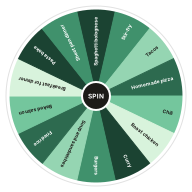 What's for Dinner Wheel
Spin for tonight's dinner. A random dinner idea wheel full of easy weeknight meals to cook at home.
Food Wheels
What's for Dinner Wheel
Spin for tonight's dinner. A random dinner idea wheel full of easy weeknight meals to cook at home.
Food Wheels
-
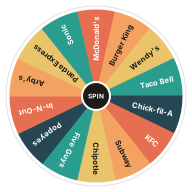 Fast Food Wheel
Spin the fast food wheel to pick a drive-through at random. A quick way to settle where to grab food on the road.
Food Wheels
Fast Food Wheel
Spin the fast food wheel to pick a drive-through at random. A quick way to settle where to grab food on the road.
Food Wheels
-
 Date Night Ideas Wheel
Stuck in a date night rut? Spin for a random date idea, from a picnic to a cooking class, and edit the wheel with your own favorites.
Decision Wheels
Date Night Ideas Wheel
Stuck in a date night rut? Spin for a random date idea, from a picnic to a cooking class, and edit the wheel with your own favorites.
Decision Wheels
-
 Brain Break Wheel
Spin for a quick brain break. Short movement and mindfulness activities to reset a classroom in two minutes or less.
Classroom Wheels
Brain Break Wheel
Spin for a quick brain break. Short movement and mindfulness activities to reset a classroom in two minutes or less.
Classroom Wheels
-
 Chore Wheel
Hand out household chores fairly with a random chore wheel. Spin to assign dishes, laundry, trash and more; no more arguing over whose turn it is.
Decision Wheels
Chore Wheel
Hand out household chores fairly with a random chore wheel. Spin to assign dishes, laundry, trash and more; no more arguing over whose turn it is.
Decision Wheels
-
 Coin Flip Wheel
Flip a coin online with a heads or tails wheel. A fair 50/50 coin toss for kick-offs, bets and quick decisions.
Decision Wheels
Coin Flip Wheel
Flip a coin online with a heads or tails wheel. A fair 50/50 coin toss for kick-offs, bets and quick decisions.
Decision Wheels
Frequently Asked Questions
Quick answers about how the wheel works, what it saves and how fair it is. Want proof? Try the randomness audit.
How do I decide what to eat?
Spin the What to Eat Wheel and go with the food it picks. Remove anything you don't feel like before spinning.
Can I put my local restaurants on the wheel?
Yes. Replace the food types with restaurant names, one per line. Your list is saved in this browser.
What if the wheel picks something that's closed?
Spin again, or remove places that are closed before you spin. Reset brings the full list back later.
Can I plan a week of meals with the wheel?
Yes. Turn on Remove the winner automatically in Settings and spin seven times. The Results tab keeps the list.
How do we handle allergies or diets in a group?
Remove anything someone in the group can't eat before spinning, so every result works for everyone.
Can I change the entries on this wheel?
Yes. Edit the Entries box next to the wheel, one entry per line, and the wheel updates as you type. Your version is saved in this browser, and Reset brings back the template's entries.
Does the wheel keep my results?
Yes. The Results tab lists every spin, newest first, until you clear it or leave the page. Your entries and settings stay saved in this browser.
Does this wheel work on my phone?
Yes. It works in any modern browser on phones, tablets and computers, with nothing to install.
What if I don't like the result?
Spin again. If a result disappoints you, that can be a useful sign of what you really wanted.
Ready to Spin?
Your wheel is waiting at the top of the page, just as you left it.